

How to Connect AI to Your Hotel PMS: A Step-by-Step Setup Guide
Set up an AI agent with your hotel PMS: four access levels, how OPERA Cloud, Mews, Cloudbeds and Apaleo connect, nine setup steps and a go-live test script.
Deepak Sharma ·
Guests write to hotels by text, WhatsApp, email, web chat and through Booking.com, Expedia and other booking sites. A unified inbox puts every message in one thread per guest, tied to the booking. Here is which channels to include, how to connect each one and how to let AI answer the routine messages.
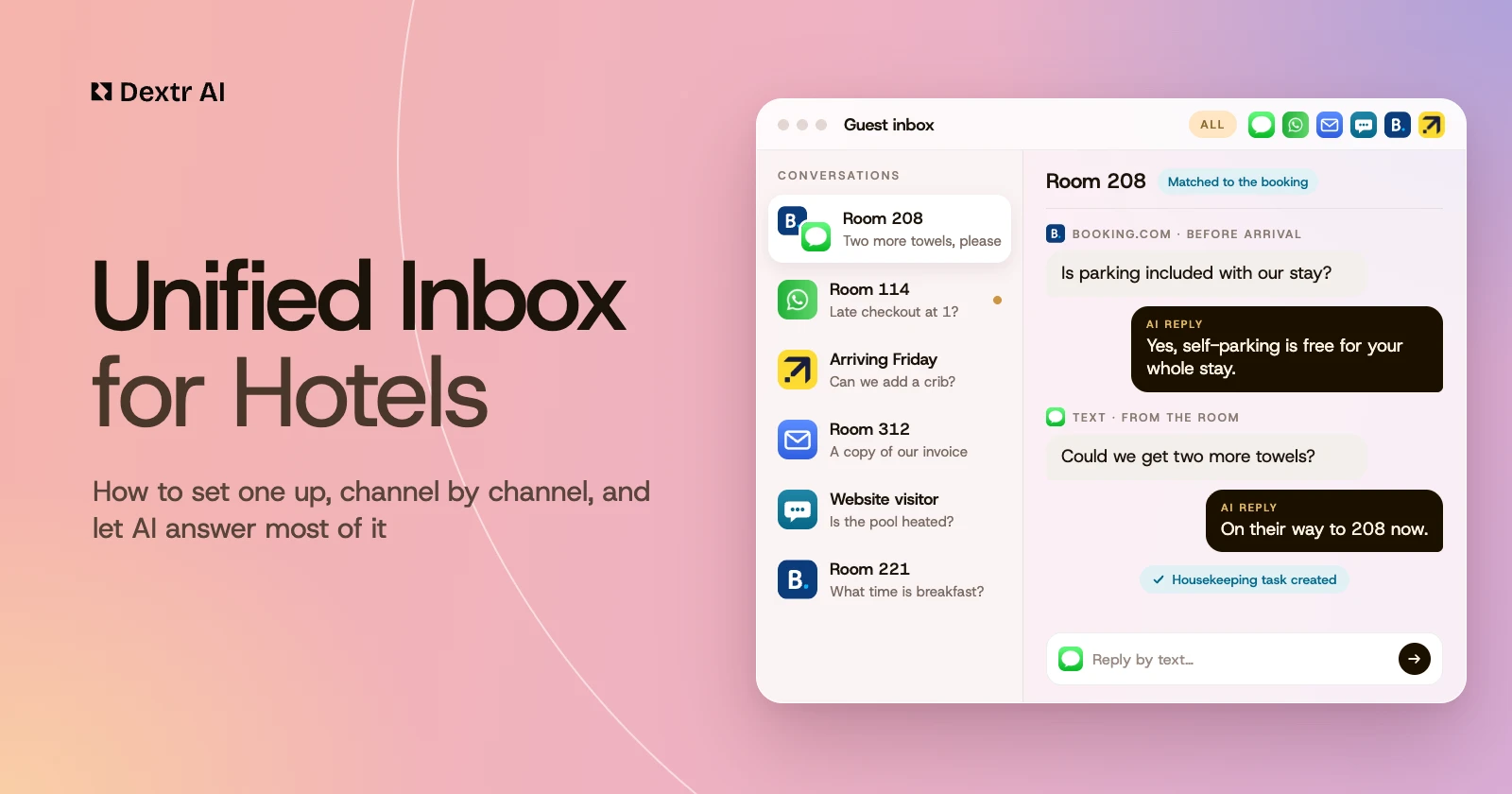
A unified inbox for hotels puts every guest message in one thread per guest, matched to the reservation. That covers texts, WhatsApp, email, web chat and the inboxes on Booking.com, Expedia and other booking sites. To set one up, list where guests write to you today, connect each channel, link the inbox to your PMS, decide who owns each kind of message and let AI answer the routine ones, with clear rules for what goes to staff.
Below, I cover what a unified inbox is, which channels to include, how to set one up in eight steps and what to ask before you choose unified inbox software. I also show how Alfred by Dextr AI answers most messages on its own.
Key takeaways
A unified inbox for hotels is one screen where staff, and more and more often an AI agent, read and answer every guest message, whichever channel it arrived on. Each guest gets one thread, so a question sent on Booking.com before arrival and a text sent from the room sit together, next to the room, dates and balance from the PMS.
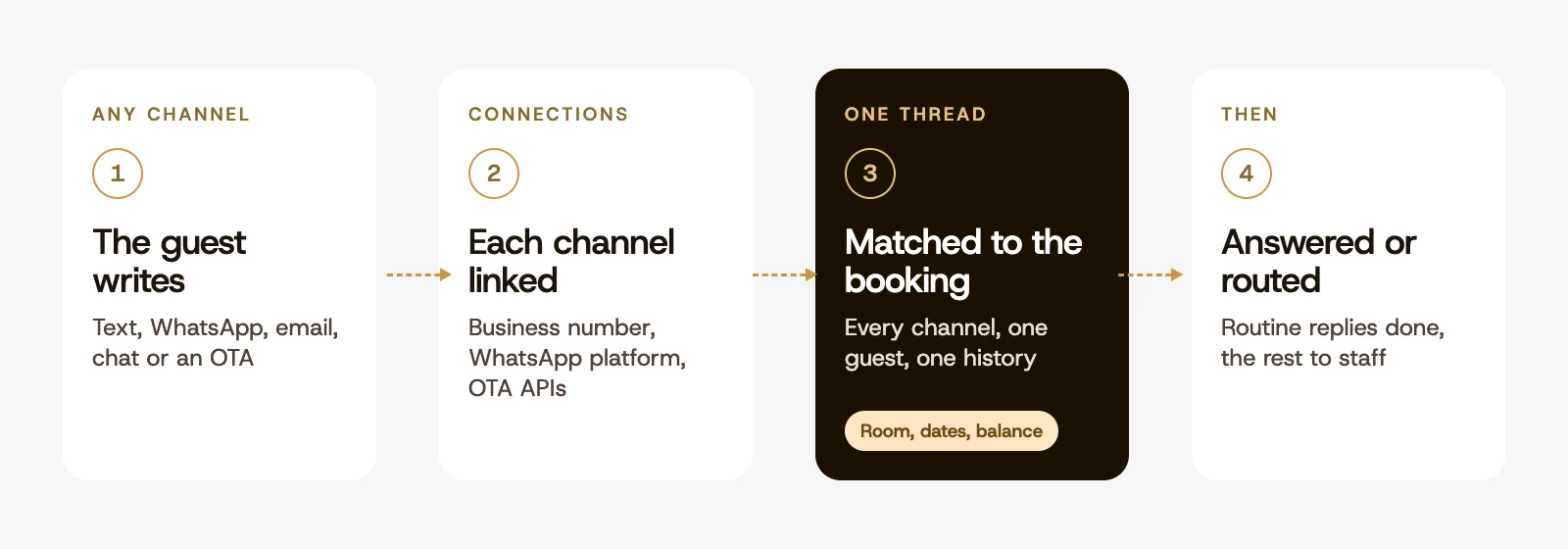
Without one, a front desk usually juggles five or six places:
Messages wait between those screens, two people answer the same guest, and nobody can see the whole conversation when a guest complains at checkout.
Many guest messages are really requests for work: two more towels, a rattling air conditioner, a crib for tonight. A unified inbox earns its keep when those requests become tasks instead of sitting as chat lines. At Dextr AI, that job goes to Manny, our AI operations agent. When a guest texts that the air conditioning in room 208 is rattling, Manny opens a work order with the room, an owner and a timer, hands it to whoever on shift can finish it soonest and sends complaints straight to a manager. The task stays tied to the same guest record, so the next person who opens the thread can see where it stands.
A unified inbox isn’t the same as unified communications, which in hotels usually means the hotel phone system with its extensions, voicemail and call routing. It also isn’t a CRM: the inbox holds the conversation, while the PMS stays the record of the stay.
Six channels cover most hotels. Each one reaches the inbox a different way, and each has one thing to get right:
| Channel | How messages get in | Get this right |
|---|---|---|
| SMS | A business texting number, ideally your hotel’s main number, text-enabled | In the US, register the number for business texting (10DLC) and capture consent at booking |
| The WhatsApp Business Platform, connected to the inbox | Free-form replies only within 24 hours of the guest’s last message; approved templates after that | |
| Your reservations and info mailboxes, forwarded or connected | Group, wedding and contract emails still go to sales | |
| Web chat | A chat widget on your website and booking engine | Ask for the booking name or email so the chat joins the right thread |
| Booking.com | Booking.com’s Messaging API, through your inbox provider | Guest phone numbers no longer arrive with the booking |
| Expedia | Expedia Group’s messaging API for connectivity partners | Ask which Expedia booking types the connection covers |
Why the OTA inboxes matter more in 2026
Booking.com’s Reservations API stopped including guest phone numbers on 28 September 2026 (Booking.com changelog). A welcome text can’t reach those guests unless their number arrives another way, such as your own check-in form, so the Booking.com inbox becomes the main way to reach them before arrival. Every new Booking.com reservation opens a conversation that connected software can read and answer by reservation (Booking.com Messaging API).
Add other channels only where your guests already write. Properties that also list on Airbnb or Vrbo should check that the inbox carries those messages too, and resorts that get Instagram or Facebook messages can add them. There is no Google chat to connect anymore: Google ended chat in Business Profiles on 31 July 2024 (Google). Phone calls stay with your phone system, though a good setup adds each call’s summary to the same guest record.
The order matters. Connect the channels before you add AI, and link the PMS before you write routing rules, because the rules depend on knowing who the guest is.
For one typical week, count the messages on each channel, and note who answered them and how long the first reply took. That week is your baseline. The OTA message centers and the phone at the desk are where messages most often wait, because nobody owns them.
Booking.com and Expedia both let connected software read and answer guest messages: Booking.com through its Messaging API, and Expedia through the messaging capability in its Lodging Supply API (Expedia Group). Your inbox provider handles the connection, so ask whether it goes direct or through your PMS or channel manager, and don’t connect the same property twice. Then review the scheduled messages set up in each extranet, so guests don’t get two welcome messages.
Text-enable your hotel’s main number if your provider supports it, so guests can text the number on their confirmation, or use a local number set aside for texting. Never run guest texting from a staff member’s own phone. In the US, carriers have blocked business texts from unregistered local numbers since early 2025, so register the number for 10DLC texting before go-live. Capture consent at booking, keep stay messages separate from promotions and honor STOP replies; the consent and opt-out rules cover the details.
The WhatsApp app on a shared phone works until two people answer at once or the phone goes home with a shift. Connect WhatsApp to the inbox through the WhatsApp Business Platform instead, so every reply is shared and logged. One rule shapes how you use it: you can reply freely within 24 hours of the guest’s last message, and outside that window only with templates Meta has approved (Meta). Prepare templates for the messages you send first, such as the pre-arrival welcome.
Forward or connect your reservations and info mailboxes, and add the chat widget to your website and booking engine. Keep group, wedding and contract emails routed to sales, since they need a proposal rather than a quick reply. Ask web chat visitors for their booking name or email, so each chat joins the right thread.
This step turns a shared screen into a hotel inbox. Once you connect the inbox to your PMS, each thread shows the guest’s room, dates, balance and past stays, and messages from the same guest on different channels merge by phone number, email or reservation number. Staff stop asking guests to repeat themselves, and an AI agent can answer from the booking instead of guessing.
Write down where each kind of message goes:
Set a first-reply target for each, and keep tags simple enough that the night auditor uses them too.
With every channel in one place and every thread tied to a booking, an AI agent can take the first reply. Start it on routine questions such as parking, Wi-Fi, check-in times and directions, then let it act: offer early check-in and post it to the folio, send the access code, take a payment by link. List what always goes to a person, such as complaints, billing disputes, safety issues and VIPs, and tell guests when they are talking to AI.
Make taking over easy. At Las Pinos Campground, every conversation streams to a private team channel. A manager replies to step in, the AI pauses with the full history, and it picks up again when staff step back. Alfred handled 4,648 text conversations there in five and a half months, with one or two people at the desk.
After go-live, compare four numbers with your baseline week: time to first reply, the share of conversations resolved without staff, messages still unanswered at the end of each shift, and your Booking.com and Expedia review scores.
Most hotel guest communication software now includes an inbox, so the differences lie in what it connects to and what it can finish. Ask each vendor to show these working on your own property:
Which channels share one thread per guest? SMS, WhatsApp, email, web chat, Booking.com and Expedia, plus any others your guests use.
How do Booking.com and Expedia messages arrive? Directly through the OTAs’ messaging APIs or through your PMS or channel manager, and how quickly.
Which PMS fields can it read, and what can it write back? Reading the booking is the minimum; posting upsells and charges to the folio is what saves staff time.
Can we text from our existing number, and who handles the 10DLC registration? Get the timeline in writing, since unregistered numbers are blocked.
Does an AI agent answer, or only suggest replies? Ask what share of conversations it resolves without staff today and how it decides to hand off; hotel chatbots differ most on whether they finish the request.
How does a staff member take over a conversation? One reply, a button or a reassignment, and whether the guest notices the switch.
Which languages does it handle? Ask about the guest’s side and the staff’s side, since a reply in Spanish still needs a brief your team can read.
How is it priced? Per room, per conversation or by usage, what counts as a conversation when a guest writes on two channels, and whether texting and WhatsApp fees are included.
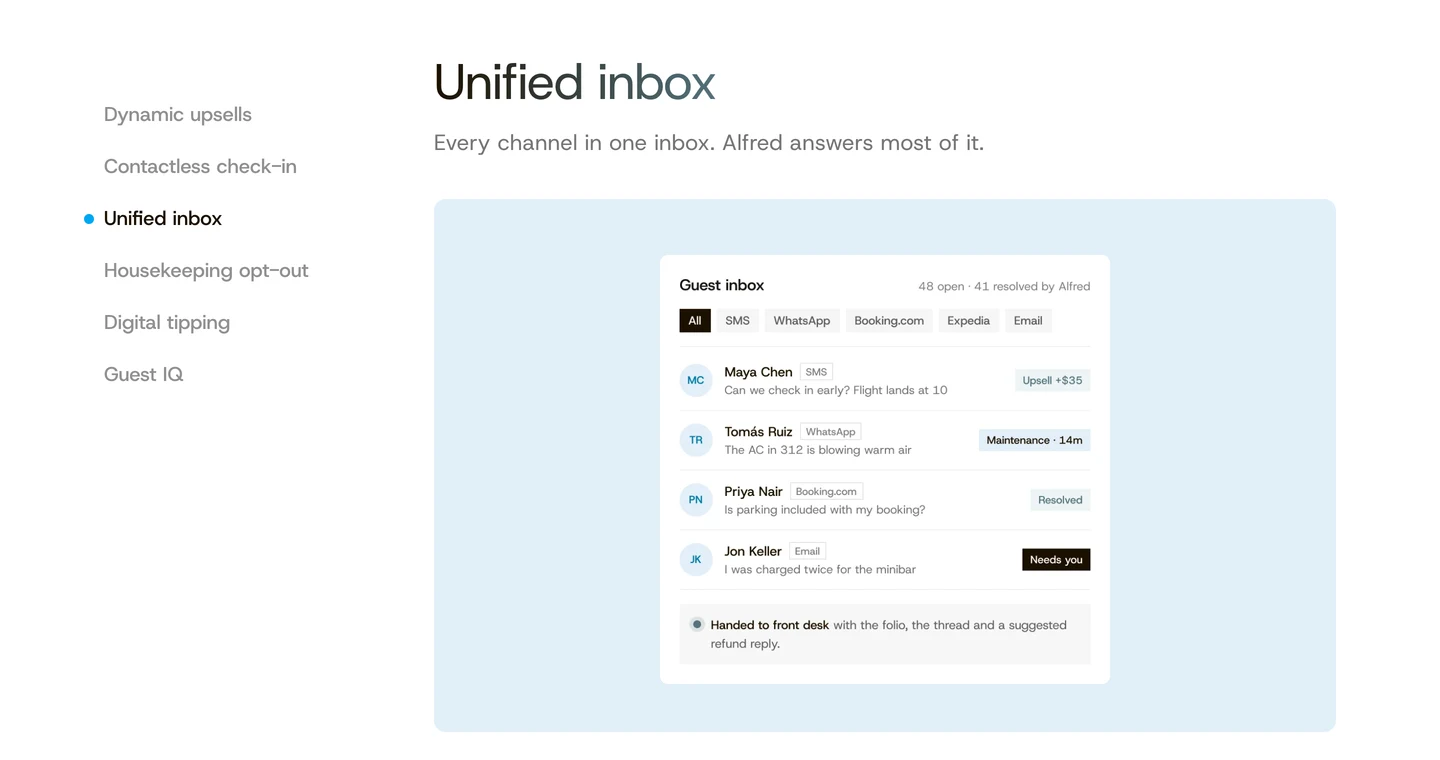
Alfred is the guest messaging agent in Dextr AI’s team of AI agents, and its unified inbox is where the eight steps above end up. SMS, WhatsApp, email, web chat, Booking.com and Expedia messages land in one thread per guest, and Alfred handles around 90% of requests on its own, from your knowledge base and the reservation. The rest go to the right person with the whole conversation attached.
Pricing is usage-based, set by your workflows, property size and volume, and Dextr AI goes live in about seven days.
Alfred at three California hotels
In a pilot at three California hotels, Alfred texted every guest from booking to checkout, captured requests before arrival and passed problems to managers before they became reviews. All three hotels raised their scores on both Booking.com and Expedia, by up to 0.4 points.
A unified inbox for hotels is less about software than about ownership: every message, on every channel, in one thread that someone, or something, is responsible for answering. Connect the six channels, tie each thread to the booking, write down who owns what, and let AI take the routine replies so your team has time for the guests in front of them.
A unified inbox for hotels is one screen where staff, or an AI agent, read and answer guest messages from every channel, such as SMS, WhatsApp, email, web chat, Booking.com and Expedia. Each guest gets one thread, matched to the reservation in the PMS, so nobody has to check five places or ask the guest to repeat themselves.
Most hotels need six: SMS, WhatsApp, email, web chat, Booking.com and Expedia. Add Airbnb, Vrbo, Instagram or Facebook messages only if your guests already write there. Google Business Profile chat ended on 31 July 2024, so there is no Google chat to connect.
Yes. Booking.com’s Messaging API and the messaging capability in Expedia Group’s Lodging Supply API let connected software read and answer guest messages, so replies can come from your unified inbox instead of the Booking.com extranet or Expedia Partner Central. Your inbox provider or channel manager makes the connection.
Not through connected software. Booking.com’s Reservations API, which PMSs and channel managers use, stopped including guest phone numbers on 28 September 2026, a change Booking.com describes as a security measure to protect guests. Message those guests in the Booking.com inbox, or collect a number with consent at check-in.
Often, yes. Many landline and VoIP numbers can be text-enabled, so guests can text the number on their confirmation. In the US, register the number for 10DLC business texting first, because carriers block business texts from unregistered local numbers.
Yes, through the WhatsApp Business Platform connected to your inbox rather than the app on a shared phone. You can reply freely within 24 hours of the guest’s last message; outside that window, you can only send templates Meta has approved, such as a pre-arrival welcome.
Vendors price per room, per conversation or by usage. When you compare quotes, ask what counts as a conversation, whether an AI agent is included or extra, and whether texting and WhatsApp fees are passed through. Dextr AI’s pricing is usage-based, set by your workflows, property size and volume.
No. The PMS stays the record of the stay. The unified inbox reads the booking to show staff, or an AI agent, who the guest is, and the better ones write back to it, for example posting an upsell to the folio or noting a request.
Set up an AI agent with your hotel PMS: four access levels, how OPERA Cloud, Mews, Cloudbeds and Apaleo connect, nine setup steps and a go-live test script.
Deepak Sharma ·
11 AI tools for hotel call centers, compared on the four jobs AI does there: answering and booking calls, coaching agents, routing callers and scoring calls.
Deepak Sharma ·
Twelve AI hotel software vendors rated with real review data from Hotel Tech Report and G2, starting with Dextr AI, whose voice, guest messaging and chatbot products are each rated 5.0 on Hotel Tech Report. See every vendor's star rating, review count and HT Score, what hoteliers praise and flag, and how to read the reviews before you buy.
Deepak Sharma ·